
Author: ruchikakharwar

Part 1 – Let get the paas party started!

Part 1 – Let get the paas party started!

There are multiple options to choose an infrastructure and multiple ways to provision it. My first choice would be to use ansible playbooks with my servers at home but because customers come first and I wanted to be best positioned to help my customer I landed up using Terraform to provision my AWS account with the resources required to install openshift 3.6 on it.

At this point it would be noteworthy that the description below is for a single master, non HA deployment. That means there is no redundancy in my environment. If the master instance becomes unavailable my openshift environment is as good as a dead fish.  This is the architecture I aimed for with my terrafterrafromorm scripts.
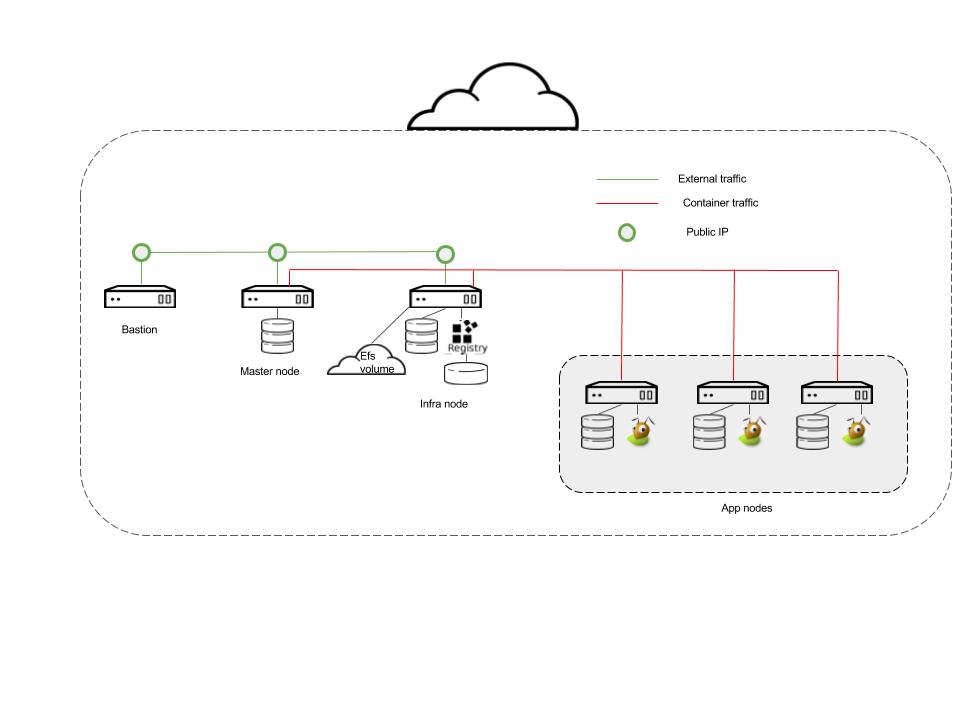
 

aws_ose_nonha (1)

Salient features that need consideration from the architecture above are

  • Bastion, Master and Infra nodes need to exist on the public VPC.
  • All nodes, bastion, master, infra and app nodes exist on the private VPC
  • The master and Infra nodes have 2 disks each, 1 disk is for the OS and the second for docker storage.
  • S3 bucket provisioned for registry storage
  • Each app node has 3 disks.
    • Disk 1 – For the OS
    • Disk 2 – Docker Storage
    • Disk 3 – Gluster device 1
    • Disk 4 – Gluster device 2
  • 3 elastic IPs created and assigned 1 each to bastion, master and infra node
  • EFS volume created for some openshift purposes.

A. Once you’ve determined what kind of storage you want to use for the various openshift pieces i.e.

Local docker storage -> Allocated disk

Registry -> S3

Logging-> AWS EFS

Monitoring -> AWS EFS

Applications -> Gluster CNS (so set aside 2 devices per app node)

B. You’ve followed the recommendations from the Red Hat on instance sizing by following this link Red Hat Openshift 3.6 System Requirements and this is the mapping of the node type and the min AWS instance type.

master node -> t2.xlarge

infra node -> t2.xlarge

app node -> t2.large

C. You are all set to use terraform to provision the AWS env. The github link here has the files required to spin up the environment. The things you’d need to take care of are:

keypairs.tf : This references admin-key so you should have that key created as per AWS requirements.

terrafrom.tfvars: Should have the aws keys specified for you

s3registry.tf: Replace the string “Insert name here” with your “bucket name”

infra.tf: Replace <domain> with your owned name. Eg for my environment the domain I own is rukh.org so I have <domain> replaced with “rukh”.

Once you have the files modified you are ready to install and run terraform.

Any tutorial on youtube on terraform will tell you to install and run terrafrom. In my references I have a link to the terrafrom tutorial I referred to.

So continuing with the provisioning.

After you run with the a

terraform apply

You should have all the components from the figure set up and ready to proceed with the next stage of actually installing openshift (Upcoming Part 2)

References

[1] Terraform tutorial

[2] OpenShift documentation

Forgot about me!

Forgot about me!

Before I get started with my first real blog post, I probably deserve a mention about myself. I am a Cloud Success Architect@Red Hat. I joined Red Hat a little over 2 years ago and boy, have I been busy! I should mention I made a quite a a shift in my career a few years ago. I worked @Texas Instruments for several years as a C/Assembly developer, test and validation engineer and device drivers. I have been blessed to meet wonderfully collaborative colleagues and stellar mentors wherever I’ve been.

Before I fall into a memory lane, coming back to a “Cloud Success Architect”.. the role means that I get to work on whatever my assigned customer deems important and I help them every step of the way as they move their cloud environment from a “Proof of concept” to “Production”. Often, it is with helping with an install, working with support, answering questions, sharing best practices and aligning the stars @Customer with the stars @Red Hat to come together to solve problems. I am the technical contact@Red Hat for my customer and also their advocate within Red Hat in case of RFEs (Request for Enhancements) or lighting a little fire on open bugs. I wish at some point my account engagements would start looking a little similar, but my discovery so far has been that, ” THERE ARE NO TWINS!”. I change and am flexible for every one of my customers to maximize success for my customer. Personally, it works for me very well since I like to believe I am a creative and resourceful person so it gives me that opportunity to prove it all the time.

The products I’ve been working with so far are Openstack and Openshift. My office is messy and my life a constant churn to try out the latest cloud products from Red Hat. I have servers at home heating my office (handy in winter for sure).

Often this is what  my lab life looks like.

while (1) {

/* deploy a product */

/* play with customer use case or a feature */

/* tear down environment */

}

So, you want some Paas along with the Dazz…

So, you want some Paas along with the Dazz…

You’ve got a bunch of pets in your data center (or maybe your basement) but the time has come for a revolution. Everyone in the industry is talking about “Platform As A Service” and its time to leave the shadows and give it a whirl.

While you know you definitely want to give that environment a try, you also battle with various emotions like ..  “I want to provision it correctly and consistently”. “I don’t want another pet in my basement so let’s try Amazon Web Services !”

Like every new shiny car you want, you want the process to be as painless and fast.

So with these wonderful thoughts, I am on this journey to create a multipart blogging  series that takes a reader from provisioning a minimal environment to installing a paas on it. The next part talk about using Terraform to provision your AWS environment in readiness to install my and possibly your favorite paas product.